
ChatGPT Caricature: How to Turn Photos into Caricatures with AI
By the Chatgbot Team · Published July 20, 2026
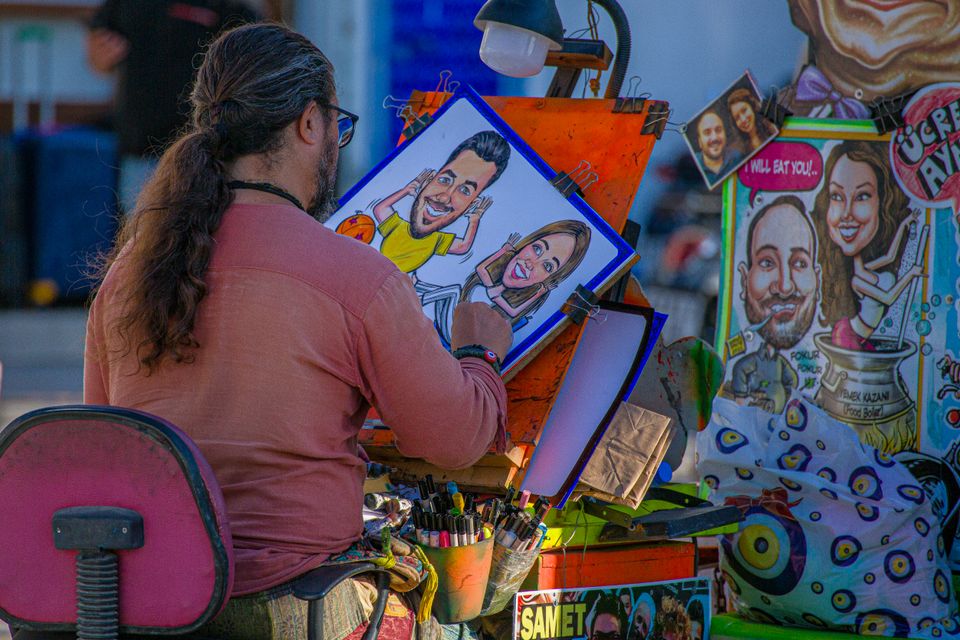
Scroll through any social feed right now and you will see them: friends redrawn with giant grins, tiny bodies, and gloriously oversized heads. The ChatGPT caricature trend has turned a classic boardwalk art form into something anyone can try in under a minute. Upload a photo, paste a prompt, and ChatGPT's image tools hand back a cartoon version of you.
The results can be hilarious, flattering, or occasionally horrifying, and the difference usually comes down to the prompt and the photo you start with. This guide walks through the whole process: how the trend works, copy-paste prompts for eight different styles, tips for getting a caricature that actually looks like you, and what to do when the AI gives you the wrong hair or a melted face.
What Is the ChatGPT Caricature Trend?
A caricature is a drawing that exaggerates a person's most recognizable features for comic effect. Big smile, bigger. Curly hair, curlier. Traditional caricature artists do this by hand at fairs and weddings. The AI version does it in seconds from a single photo.
ChatGPT's built-in image generation can analyze an uploaded photo and redraw the person in a chosen art style while keeping the likeness. That capability sparked the trend: people post side-by-sides of their real photo next to an exaggerated cartoon, a Pixar-style render, or a newspaper-style political cartoon of themselves. Pets and couples followed.
The appeal is simple. An AI caricature is personal, shareable, and free to redo until you like it.
How to Make a ChatGPT Caricature, Step by Step
- Pick the right photo. Use a sharp, well-lit, front-facing photo with one person in frame. Avoid sunglasses, heavy shadows, and busy backgrounds. The clearer your features, the better the likeness.
- Upload the photo. Start a new chat, attach the image, and let it finish loading before you send.
- Paste a caricature prompt. Tell the AI the style you want and which features to exaggerate. Specific beats vague here, so use one of the templates below.
- Refine the result. Treat the first image as a draft. Reply with corrections such as "keep my actual hairstyle" or "exaggerate the smile more, but keep the eyes realistic".
- Ask for variations. Once the likeness is right, request the same caricature in different styles or poses, then download the ones you like.
8 Copy-Paste ChatGPT Caricature Prompts
Paste any of these after uploading your photo. Swap the bracketed parts for your own details.
1. Classic exaggerated caricature. "Turn this photo into a classic hand-drawn caricature. Exaggerate my [smile / eyebrows / hair] while keeping my face clearly recognizable. Big head, small body, bold ink lines, soft watercolor shading, plain white background."
2. Pixar-style 3D cartoon. "Redraw the person in this photo as a 3D animated movie character in a warm, family-film style. Large expressive eyes, soft lighting, slightly exaggerated proportions, cheerful expression. Keep my hairstyle, hair color, and skin tone accurate."
3. Political-cartoon style. "Create a newspaper political-cartoon version of this photo. Cross-hatched ink shading, exaggerated facial features, expressive body language, monochrome with one accent color. Satirical but friendly, no text or captions."
4. Couple caricature. "Turn the two people in this photo into a single caricature scene. Exaggerate each person's most distinctive feature, keep both faces recognizable, and show us [dancing / cooking / on a road trip]. Bright colors, playful mood."
5. Pet caricature. "Make a caricature of the pet in this photo. Exaggerate the [ears / eyes / fluffy fur] and give it a funny human-like expression. Cartoon style with bold outlines and a simple pastel background."
6. LinkedIn-safe professional cartoon. "Create a polished, professional cartoon portrait from this photo. Subtle exaggeration only, friendly confident expression, business-casual outfit, clean neutral background. Suitable as a professional avatar."
7. Retro comic-book style. "Redraw me from this photo as a 1960s comic-book character. Halftone dots, bold outlines, dramatic pose, vintage color palette. Exaggerate my expression but keep my face recognizable."
8. Street-artist quick sketch. "Turn this photo into a quick street-artist caricature sketch. Loose pencil and marker lines, oversized head, tiny body doing [my hobby], visible sketch strokes, white paper background."
Tips for a Better Likeness
- Name your key features. Tell the AI what makes you recognizable: "keep my round glasses, freckles, and curly dark hair". Models keep what you name and improvise the rest.
- Exaggerate one thing, not everything. A good ChatGPT caricature prompt picks one or two features to push. Exaggerating everything turns you into a generic cartoon stranger.
- Lock the details that drift. Hair color, eye color, and facial hair are the most common misses. State them explicitly even though they are visible in the photo.
- Iterate in the same chat. Corrections like "closer to my actual nose" work better than starting over from scratch.
Common Failures and How to Fix Them
Distorted or melted faces. This usually happens with low-resolution photos or extreme exaggeration requests. Use a sharper image and soften the instruction to "moderate exaggeration".
Wrong hair. AI image models love to invent hairstyles. Spell it out: "short straight black hair with a side part, no beard". If it still drifts, correct it in a follow-up message instead of regenerating from scratch.
Lost likeness after edits. Each edit can move the image further from your face. If a version looks like nobody you know, restart from the original photo with a more specific prompt.
Extra fingers and warped glasses. Ask for a head-and-shoulders crop or "hands out of frame" to avoid most of it.
A Quick Privacy Note Before You Upload
You are sending a photo of a real face to an AI service, so take a little care. Only upload photos of yourself, or of people who are fine with it. Be especially thoughtful with photos of children. Check your account's data settings if you do not want uploads used to improve the models, and avoid photos that include documents, screens, or other sensitive details in the background.
Other AI Models That Make Great Caricatures
ChatGPT is not the only option, and not always the best for a given style. Gemini tends to produce clean, brightly lit cartoon renders and handles group photos well. Grok's image tools lean bolder and more irreverent, which suits satirical and political-cartoon styles. Each model has its own default "cartoon accent", so the same prompt produces noticeably different results. You can see how the big models stack up in our guide to the best AI for image generation.
The fun move is running the same photo and prompt through several models and keeping the best output. With Chatgbot you can do that in one app, since one subscription covers GPT-5.6, Gemini, Grok, Claude, and more, and you can switch models mid-conversation instead of juggling accounts. And if you want to go beyond caricatures and design an original character from scratch, an AI character generator workflow builds on the same prompting ideas. For a broader look at how these models differ day to day, see our Gemini vs ChatGPT comparison.
Frequently Asked Questions
Can I make a ChatGPT caricature for free?
Yes. Free ChatGPT accounts include image generation with daily limits, and paid tiers raise those limits. Apps like Chatgbot also give you image generation across several models under one subscription.
What is the best prompt for a ChatGPT caricature?
Name the style, the features to exaggerate, and the features to keep accurate. For example: "Classic hand-drawn caricature, exaggerate my smile, keep my glasses and curly brown hair accurate, big head, small body, white background."
Why does my AI caricature not look like me?
Usually the photo is too small, too dark, or shot at an angle, or the prompt asked for too much exaggeration. Use a sharp front-facing photo, name your distinctive features, and refine with follow-up messages in the same chat.
Can I use an AI caricature as a profile picture or for commercial projects?
Profile pictures are generally fine. For commercial use, check the current terms of the model you used, since usage rights differ between services and change over time.
Try the Same Photo Across Every Model
The fastest way to a caricature you love is comparison, not repetition. Chatgbot puts GPT-5.6, Gemini, Grok, Claude, DeepSeek, and more in one app, so you can upload your photo once, run your favorite prompt through multiple models, and keep the caricature that gets you just right.